
Why Implement an Integrated ERP System Within Your Organization?
- MS Dynamics 365 BC
- MS Dynamics GP

Microsoft is accelerating the integration of artificial intelligence into Microsoft Dynamics 365 Business Central. In fall 2026, Microsoft presented a new Copilot experience, data editing through simple instructions, business rules to guide AI, and the upcoming arrival of Business Central in Copilot Cowork.
PRODUCTS
These updates build on capabilities finance teams already use, such as Copilot and AI agents. Here is what they mean for financial management and what’s coming next.
In Business Central, Copilot already lets you chat with your data in natural language, summarize a record, create an analysis view without any setup and speed up bank reconciliation. These capabilities are covered in detail in the benefits of Copilot in Business Central.
Agents go further: they handle a specific task from start to finish, then submit their work to a person for review. The Payables Agent processes vendor invoices received by email, while the Sales Order Agent turns a customer request into a quote, then into an order.
For a broader overview, see how AI agents work in Dynamics 365 and Business Central.
Microsoft’s agents improve with every Business Central update. Four recent developments are particularly relevant for finance teams.
With version 29, Microsoft improved how the Payables Agent matches invoices to purchase orders. Update 29.1 also enables it to process vendor credit memos.
The Expense Agent, still in preview, tackles expense reports. Employees take a photo of their receipt in the mobile app or upload it on the web.
AI extracts the amounts, taxes and vendor, even on a multi-line hotel bill, then categorizes the expense. The result: an expense report ready for approval, with no manual entry and fewer coding errors.
According to Microsoft’s documentation, the Payables Agent, the Sales Order Agent and the Expense Agent are available in all Business Central country versions, including Canada. All three support both Canadian English and Canadian French, which matters for bilingual teams.
Beyond Microsoft’s agents, organizations can design their own agents, notably in Copilot Studio, and connect them to Business Central through its MCP server. MCP (Model Context Protocol) is a standard protocol that lets an AI agent discover and use an application’s data and functions, within the limits of the user’s permissions.
For example, an agent connected to Business Central project tables can produce a project health report from a simple question: budget used, remaining budget and a warning about a task that is over budget, with a direct link to the project.
In fall 2026, Microsoft shared its vision for AI in Business Central with partners, and the message was clear: we will no longer work in the system, but with it.
| Today | Tomorrow |
| Users navigate forms, fields and menus | Copilot becomes the interface, in Business Central, Outlook or Teams |
| Knowing where to click is the skill | Users describe the need, review and decide |
| One question at a time, one answer at a time | Cowork completes an entire piece of work, in several steps |
| Reports built manually in Excel from data exports | Analyses and dashboards generated on demand from your data |
Business Central remains the system of record. However, users will increasingly access it through conversation.
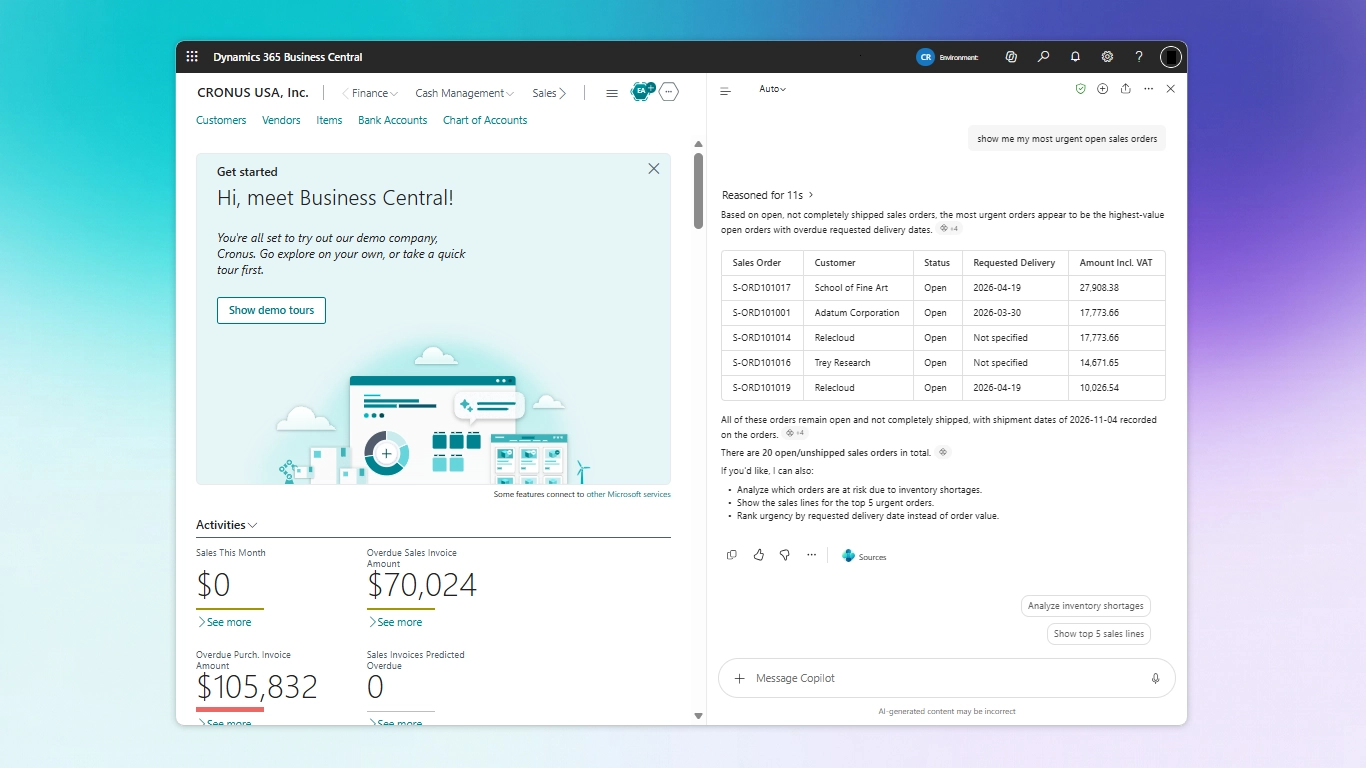
Business Central version 29 (2026 release wave 2) replaces the previous chat pane with Microsoft Copilot, available in public preview. The experience is the same as Microsoft 365 Copilot in Outlook, Teams or Excel, so there is one interface and one way to chat.
What doesn’t change is that Copilot answers from your Business Central data, cites its sources so you can verify them and respects user permissions. Behind the scenes, Microsoft automatically selects the most appropriate AI model for each task.
The new Copilot can also format its answers as tables or charts. A few sample prompts:
Copilot can also take the analysis further. From a few prompts, with no template or special context, it can produce an aged accounts receivable summary, flag a customer who is over their credit limit and suggest an action plan.
With Edit with Copilot, an upcoming capability, Copilot will no longer just answer: it will be able to change data in Business Central based on user instructions. This capability also inherits the permissions of the signed-in user.
Microsoft is also preparing Business Skills, business rules written in plain language that tell Copilot and agents how to behave in Business Central. For example, a rule could specify under which conditions to add a particular item to a sales order.
The principle is simple: the clearer the instructions Copilot receives, such as a report template or company colours, the more consistent its results.
Copilot Cowork is a Microsoft 365 Copilot capability that completes an entire piece of work in several steps. Microsoft made it generally available in June 2026. It is already used by more than half of Fortune 500 companies and is the fastest-growing capability in Microsoft’s Frontier program.
The difference from chat is simple. With chat, you ask a question and get an answer. With Cowork, you delegate work: Cowork plans the steps, retrieves the data, performs the analysis and delivers a result, whether a report, a dashboard or a presentation. A task can also be scheduled to run regularly, for example every Monday.
Next up is the arrival of Business Central in Cowork. Through the Business Central MCP server, Cowork will be able to read your data securely, without custom-built APIs and always with the permissions of the signed-in user. It will even be able to assign tasks to your Business Central agents and track their results.
An example presented by Microsoft, using demo data, shows the potential: “Do a complete analysis of our customer Adatum and present it as a modern Power BI dashboard.” Cowork pulled together sales, margin, open orders and payment history, then suggested action priorities. As always, the user reviews the result before sharing it.
Microsoft will also offer bundles combining Business Central Essentials or Premium with Microsoft 365 Copilot Business.
Availability dates for these new capabilities will be confirmed by Microsoft in its official communications.
Yes. Copilot capabilities such as chat, analysis assist and bank reconciliation are included with the Business Central online licence. Agents, however, are billed based on usage in Copilot Credits.
Copilot is an assistant that answers your questions and helps with your tasks. An agent handles a specific task from start to finish, such as processing a vendor invoice. Copilot Cowork completes an entire piece of work in several steps, such as a customer analysis presented as a dashboard.
Yes. According to Microsoft, the Payables Agent, the Sales Order Agent and the Expense Agent are available in all Business Central country versions, including Canada. They support both Canadian English and Canadian French.
As of November 2026, the new Copilot is available in public preview since Business Central version 29 (2026 release wave 2). Business Central in Cowork is coming soon. General availability dates for the new Copilot and for Business Central in Cowork will be shared by Microsoft in its official roadmap.
Copilot is already within reach, agents are taking on repetitive tasks, and Cowork will soon open the door to delegating complete pieces of work. To get ready, it’s worth reviewing permissions, data processing and AI costs now, topics covered in the article on governing AI in Business Central.
Want to identify which of your finance team’s processes would benefit most from AI? Book a meeting with the JOVACO team to discuss your priorities and the use cases that fit your organization.
Stay up-to-date on the latest practices in business management, digital transformation, and ERP and CRM solutions with these complementary articles.
