
Planning Your ERP or CRM Implementation: The Secret of a Successful Implementation
- MS Dynamics 365 BC
- MS Dynamics 365 CRM
- MS Dynamics GP


The Payables Agent is part of a broader shift within the Microsoft ecosystem: the move from generative AI to agentic AI.
Early Copilots suggested, summarized, and assisted. AI agents, on the other hand, execute real actions in your ERP from start to finish, without requiring human intervention at every step.
If you are not yet familiar with what AI agents are and how they fit into the Dynamics 365 ecosystem, our article Agentic AI: How AI Agents Are Transforming Dynamics 365 and Business Central is a good starting point. This article focuses on one specific feature.
The Payables Agent monitors a designated inbox and automatically intercepts invoices received in PDF format.
Without human intervention, it extracts key data from each document, identifies the corresponding vendor in Business Central, and creates a purchase invoice draft directly in the system.
It also performs intelligent mapping of invoice lines to the appropriate General Ledger accounts, based on your ERP transaction history. In other words, it learns from your accounting habits to propose allocations that are consistent with your practices.
The workflow can be initiated in two ways:
Once the message is received, the agent imports the PDF attachment, extracts the invoice information, identifies the vendor in Business Central, and prepares the draft. The agent supervisor can step in to review and confirm at each critical checkpoint, through to the finalization of the invoice.
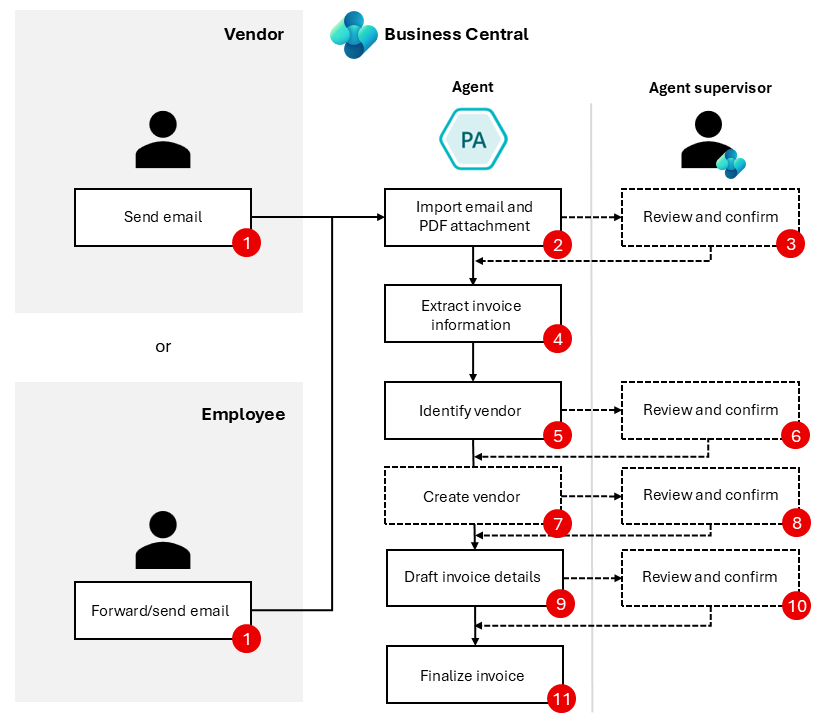
Source: Microsoft
Your teams receive drafts ready for review rather than raw invoices to process from scratch. Administrative workload decreases, processing speed increases, and the risk of data entry errors is significantly reduced.
This feature is particularly relevant for professional services firms, distribution companies, and multi-entity organizations — any structure whose finance teams manage a constant flow of incoming documents from multiple vendors.
Like any new feature, the Payables Agent is subject to a progressive rollout. Availability may vary depending on your version of Business Central, your environment, and your region.
Before planning an implementation, it is recommended to verify that your organization meets the technical prerequisites required for activation.
The agent does not work out of the box without some initial configuration. A validation period will be necessary to ensure that the General Ledger account mappings proposed by the agent align with your accounting practices.
The Payables Agent is not a gimmick. It addresses a real operational problem and is designed from the ground up to work with your teams, not in place of them.
The “human in the loop” logic is not a limitation: it is a deliberate choice by Microsoft to ensure that human judgment remains at the center of financial decisions.
The foundations need to be solid: the quality of your data, the consistency of your accounting practices, and the clarity of your internal processes will make all the difference for a smooth adoption and getting the full value out of it.
The Payables Agent is an AI agent natively integrated into Microsoft Dynamics 365 Business Central that automates the receipt and processing of vendor invoices in PDF format, from the inbox through to the purchase invoice draft.
No. The agent handles repetitive, low-value tasks, but human checkpoints are built into every critical step. The agent supervisor reviews and confirms before any finalization.
Not necessarily. The feature is rolling out progressively and availability varies depending on the version of Business Central, the environment, and the region. Verifying technical prerequisites is recommended before any planning.
Professional services firms, distribution companies, and multi-entity organizations that manage a constant flow of vendor invoices are best positioned to get value from this feature.
No. Initial configuration and a validation period are required to ensure that the General Ledger account mappings align with the organization’s accounting practices.
Interested in learning more about the Payables Agent or exploring how AI agents can transform your processes in Business Central? Contact our team to discuss.
