Long-Term Growth: An Important Factor in the Choice of Your New Solution
- MS Dynamics 365 BC
- MS Dynamics 365 CRM
- MS Dynamics GP


At a time when organizations are looking to simplify daily tasks, better interpret their data, and support faster decision-making, these enhancements address very real and practical needs.
This release introduces more intuitive interfaces, smoother navigation, and significantly enriched analytical tools. Users benefit from a more structured and fluid experience, whether they are managing vendors, monitoring purchasing activity, or analyzing sales performance. Business Central 27.0 also strengthens data visualization and modeling capabilities, offering a deeper and more accurate understanding of business activities.
Without overhauling the platform entirely, this update provides targeted refinements that make a noticeable difference in day-to-day operations. The features highlighted below were selected for their practical value and their direct impact on the way teams work.
To explore the full list of new capabilities introduced in version 27.0, you can refer to Microsoft’s official documentation.
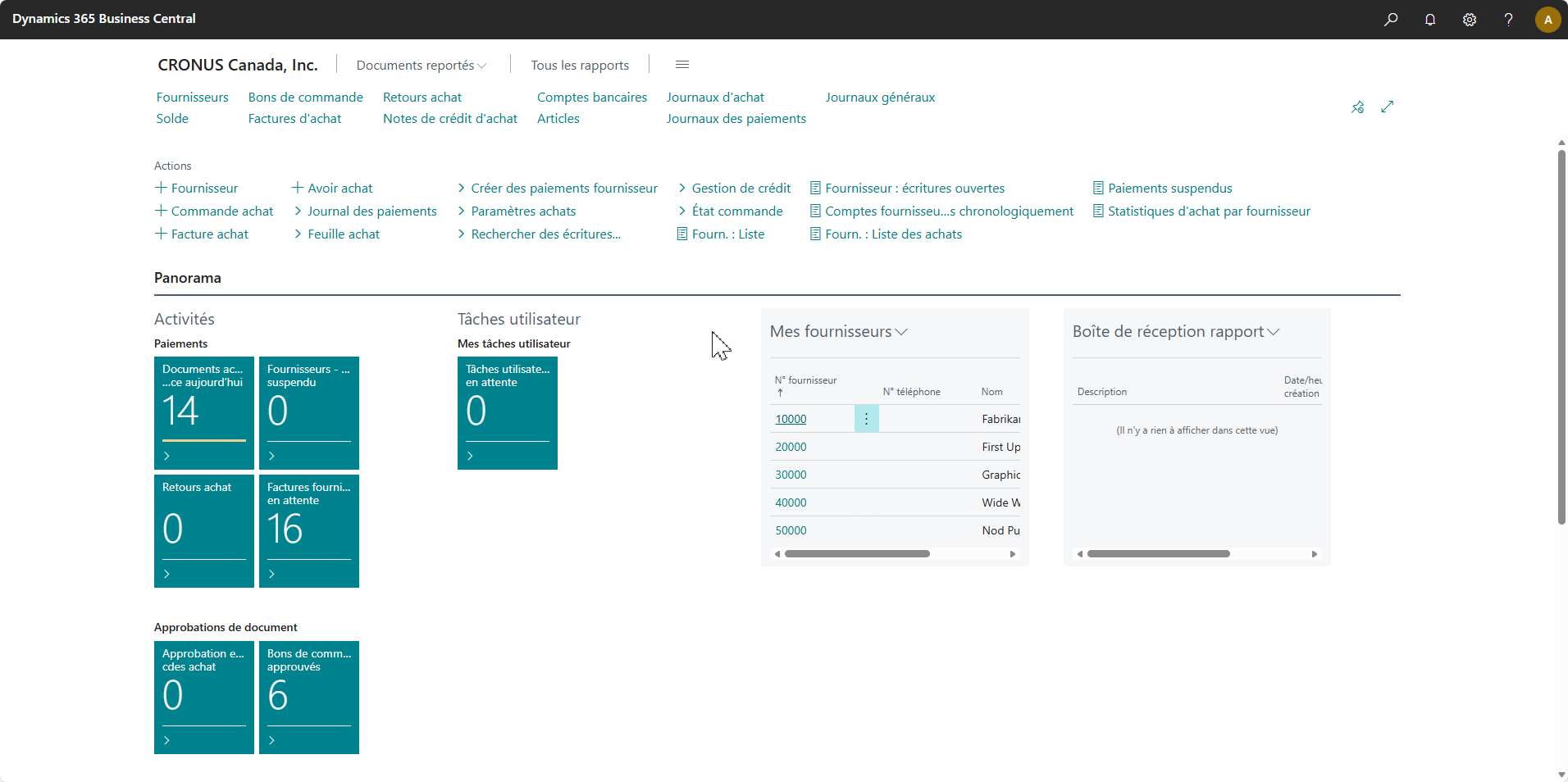
One of the most notable improvements is the redesigned Account Payable Role Center, which now offers a far more structured and centralized layout. All vendor-related tasks and documents, including purchase invoices, incoming electronic documents, approvals, and payments, are consolidated into a single interface.
This reorganization allows users to follow the flow of operations more naturally. Items requiring immediate attention are highlighted more clearly, navigation is simplified, and the risk of errors or missed steps is reduced. For teams handling a constant volume of documents, this consolidated view brings welcome clarity and contributes to smoother, more consistent daily work.
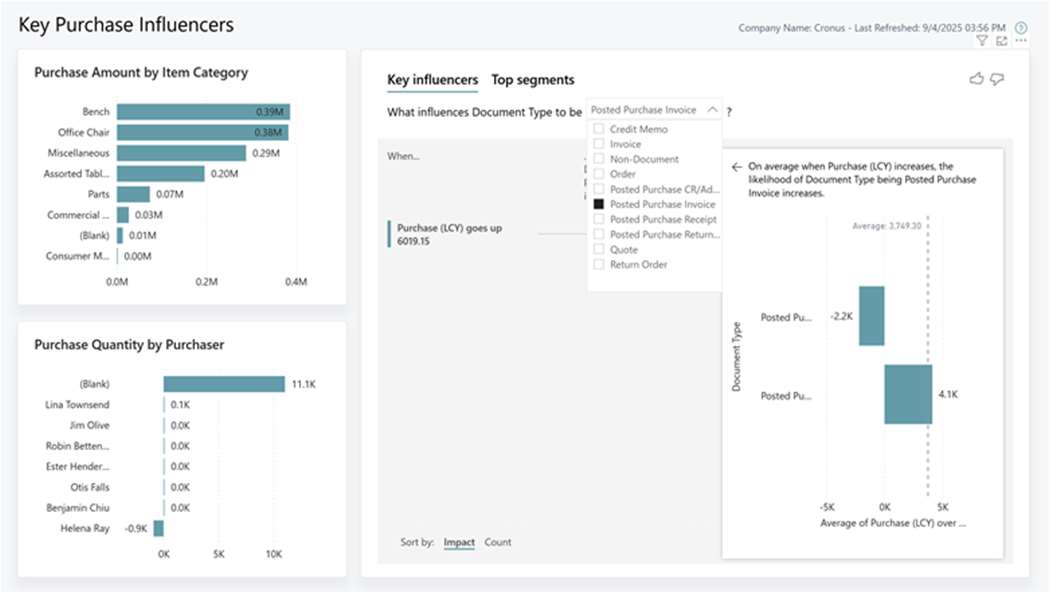
Business Central 27.0 also introduces an improved Power BI Purchasing app, featuring modernized visuals and new measures that provide richer insight into purchasing performance and potential supplier risks.
Several existing reports have been updated to offer more meaningful information:
These visualizations help teams quickly identify anomalies, patterns, or strategic dependencies. They support a better understanding of how expenses evolve over time, which vendors carry the greatest weight, and where optimization opportunities may lie. This level of analytical precision strengthens an organization’s ability to evaluate and refine its procurement processes with greater nuance and confidence.
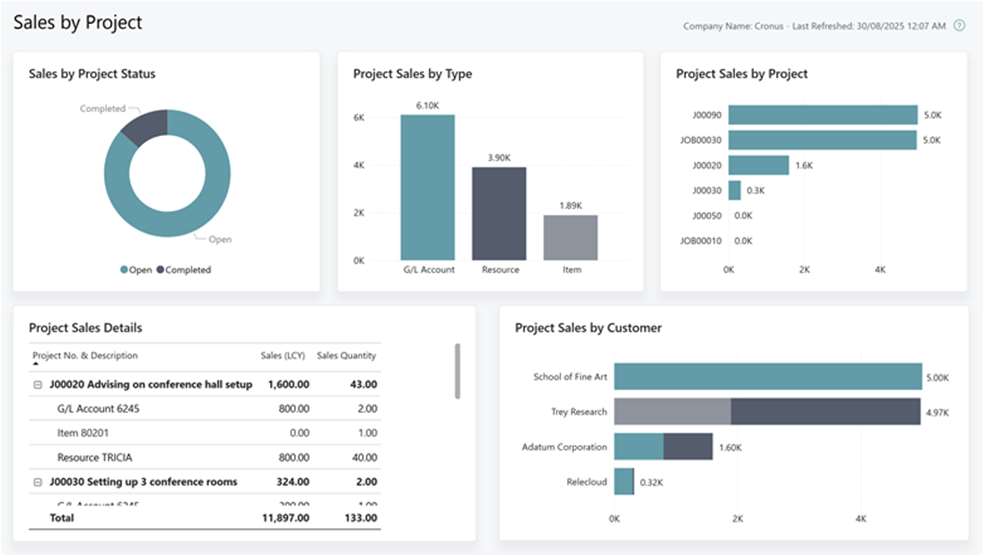
Version 27.0 also delivers several enhancements to the Power BI Sales app, which now includes new report pages, most notably a Sales Forecast report and a more consolidated view of commercial performance.
Two additions stand out in particular:
Microsoft has also expanded the underlying semantic model, making it easier to incorporate a broader range of data sources:
These improvements strengthen the quality of sales analytics and help organizations build a more coherent, consolidated view of their activities. Teams can better anticipate results, combine the most relevant data for their needs, and create reports that truly reflect their operational reality.
Business Central 27.0 introduces improvements that elevate both the user experience and the analytical depth offered by the platform. The redesigned Account Payable Role Center streamlines daily tasks, while the enhanced Power BI Purchasing and Sales apps provide clearer, more visual, and more strategic insights.
Whether your goal is to optimize document management, gain better visibility into spending, or build more structured sales analyses, this version offers tools that support informed decision-making and more efficient operations. If you’d like to explore these features in more detail or understand how they fit into your current environment, our team will be happy to assist you.